A sequence, not a pile of bookmarks
Ask an agent for “a beautiful dashboard” and the result is almost always the same: a centered hero, three cards, a purple gradient. That pattern does not belong on a quant research screen. Numbers have to stay readable. Tables and filters come before hover tricks.
Vibe-coding is not one prompt. It is stacking layers. The eight sites below do not all need to be in the same project. Split them by job, then open only the layers you actually need.
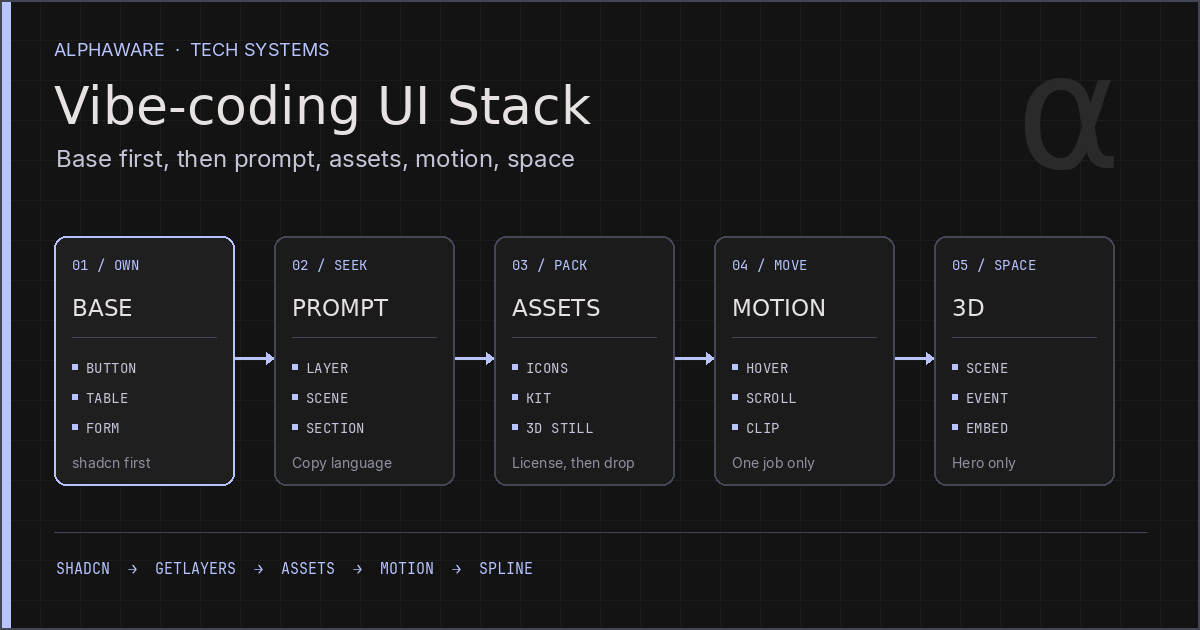
BASE  →  SEEK  →  PACK  →  MOVE  →  SPACE
shadcn   GetLayers  Craftwork   Skiper     Spline
                    Shapefest   Vengeance
                                Animmaster
The useful order is the opposite of spectacle. Lock the component base first. Then borrow prompt language, drop licensed assets, add motion in one place, and use 3D only when a hero needs it.
BASE: components — shadcn/ui
shadcn/ui is not a package. It is component source you copy and own. Use it as the starting point when React / Next.js buttons, forms, tables, and dialogs need the same tokens.
Why it fits a research UI:
- Accessibility defaults are already there. You do not bolt on keyboard support later.
- The code lives in your repo, so you can retarget the theme to a palette you already chose.
- Telling an agent “shadcn Table + filters” yields a ledger, not a card gallery.
If this layer is unset, everything above it is decoration.
SEEK: design and prompt language — GetLayers
GetLayers is not a finished site. It is a library of copyable layer prompts. Pick a scene, a gradient, or a motion section, then paste the prompt into your agent. The default output is a self-contained HTML page; one extra line can rebuild it in Next.js or Astro.
How to use it:
- Borrow mood and depth from a marketing landing, not the whole page.
- Do not search by industry. GetLayers itself says to search by feeling, not by niche.
- Write color, type, and layout constraints into the prompt. A raw paste keeps the library’s default look.
Do not wrap an entire quant dashboard in a GetLayers hero. Steal the language of one section, then redraw it on the BASE components.
PACK: design assets — Craftwork Freebies, Shapefest
Do not let the prompt invent assets. Pick files that already have a license.
Craftwork Freebies
Craftwork Freebies is a catalog of free icons, UI kits, illustrations, and mockups. Icon sets and mockups are usable immediately. Some items are AI-made 3D icons or abstract backgrounds. Look at them before they become a hero: garbled glyphs and decorative overload show up only when you open the file.
Shapefest
Shapefest is a library of 3D shapes and objects rendered in Cinema 4D. Commercial use is allowed. Some packs are free at 512px; high-res is paid. Redistributing the files as your own kit is not.
Neither site is a screenshot of someone else’s console. Take icons and shapes. Do not ship another product’s UI.
MOVE: interaction and animation — Animmaster, Skiper UI, Vengeance UI
One motion job per page is enough. Do not install all three libraries at once.
Animmaster Lib
Animmaster Lib collects web animation components: scroll, hover, page transitions, WebGL. These are hand-written code, not prompts. Most of the pack is HTML/CSS/JS; React and Next.js are a smaller share. It is a paid pack. The workable path is to upload the zip to an agent and ask it to adapt one piece to your stack. WebGL and physics belong on a marketing hero, not on an order book or a PnL table.
Skiper UI
Skiper UI is a set of uncommon components on top of shadcn/ui. Once BASE is shadcn, use it for one extra piece such as a token swap. It does not replace the table.
Vengeance UI
Vengeance UI is a React kit centered on hover, tooltips, and scroll layouts. It installs through the shadcn registry. Many patterns are for marketing sites. On a research UI, take focus and state changes, not cursor trails.
The domain spelling is vengenceui.com, not vengeance.
SPACE: web 3D — Spline
Spline is a browser tool for 3D and interaction, with export to web, iOS, and Android. It supports a viewer embed, React, and Next.js.
3D rarely helps a research product.
- Brand heroes, product mockups, logo marks
- Decorative layers that do not carry live data
Keep it out of quotes, prints, and charts. A WebGL canvas shares the main thread and the GPU. To keep a numbers screen responsive, limit Spline to one hero. Bookmark the product home, not the sign-in URL.
The order that actually ships
- Build tables, filters, forms, and empty states on shadcn.
- Copy one section or background prompt from GetLayers, then overwrite color and type with tokens you already set.
- Pick icons and shapes from Craftwork or Shapefest, and record the license.
- If motion is required, take one component from Skiper or Vengeance. Do not drop in a whole scroll library.
- Embed Spline only when the hero needs depth.
That order cuts off the path where the agent defaults to “a striking landing page.”
What not to ship
- Captures of another console or a competitor’s screen. Licensed shapes and icons are a different category.
- Free assets redistributed without checking the license.
- A GetLayers hero plus Spline plus WebGL scroll plus glow hover on the same page.
- Using up/down data colors as decoration. That erases what the numbers mean.
The eight sites at a glance
| Layer | Site | Job |
|---|---|---|
| BASE | shadcn/ui | React components you copy and own |
| SEEK | GetLayers | Layer prompts and scene language |
| PACK | Craftwork Freebies | Free UI kits, icons, mockups |
| PACK | Shapefest | 3D shape and object renders |
| MOVE | Animmaster Lib | Web animation code pack |
| MOVE | Skiper UI | Interaction on top of shadcn |
| MOVE | Vengeance UI | Hover and scroll React components |
| SPACE | Spline | Web 3D design and embed |
Related
AI Research Stack 2026: The LLM Tools Quant Developers Actually Run
Automating Quant Research with Claude API: Practical Comparison with GPT-4